
In e-commerce, few experiences are as conversion-killing as encountering an “Out of Stock” label. For customers ready to buy, this message instantly terminates their journey, often driving them to a competing site. Yet despite the significant opportunity cost, 83% of desktop e-commerce sites fail to offer users the ability to order temporarily out-of-stock products for future delivery, according to usability benchmarking data.
Modern consumers already expect delays when ordering online. They know they must wait for fulfillment and shipping. This built-in expectation opens a UX and operational opportunity: allow customers to place orders for out-of-stock items and simply extend the delivery window. When executed with transparency and operational alignment, this strategy improves user satisfaction, reduces abandonment, and preserves revenue.
Why This Matters
Usability research reveals that 30% of users encountering a stockout immediately leave to search for the product on another site, rather than engage with back-in-stock alerts or wishlists. These users aren’t merely browsing – they’re ready to purchase. Losing them represents both a missed sale and an erosion of brand loyalty.
Traditional fallback mechanisms like “Email me when in stock” or “Save to wishlist” are largely ineffective. These solutions require users to defer their purchase, often indefinitely, or force them into account creation barriers. In contrast, enabling backorders with delayed delivery respects the user’s buying intent while managing expectations without adding friction or burden.
UX Dead Ends vs. Delayed Delivery Options
The fundamental UX flaw in most “Out of Stock” implementations is that they present users with a dead end. Disabled “Add to Cart” buttons, vague availability messaging, and passive alternatives (e.g., email alerts) all signal to users: go somewhere else. From the user’s perspective, this is no different from arriving at a physical store and finding empty shelves.
Yet e-commerce holds a unique advantage: it is not bound by shelf space. If a product is restocked regularly or is in transit, the site can allow the customer to place an order with a clearly extended delivery timeline – a practice users find acceptable when transparency is maintained.
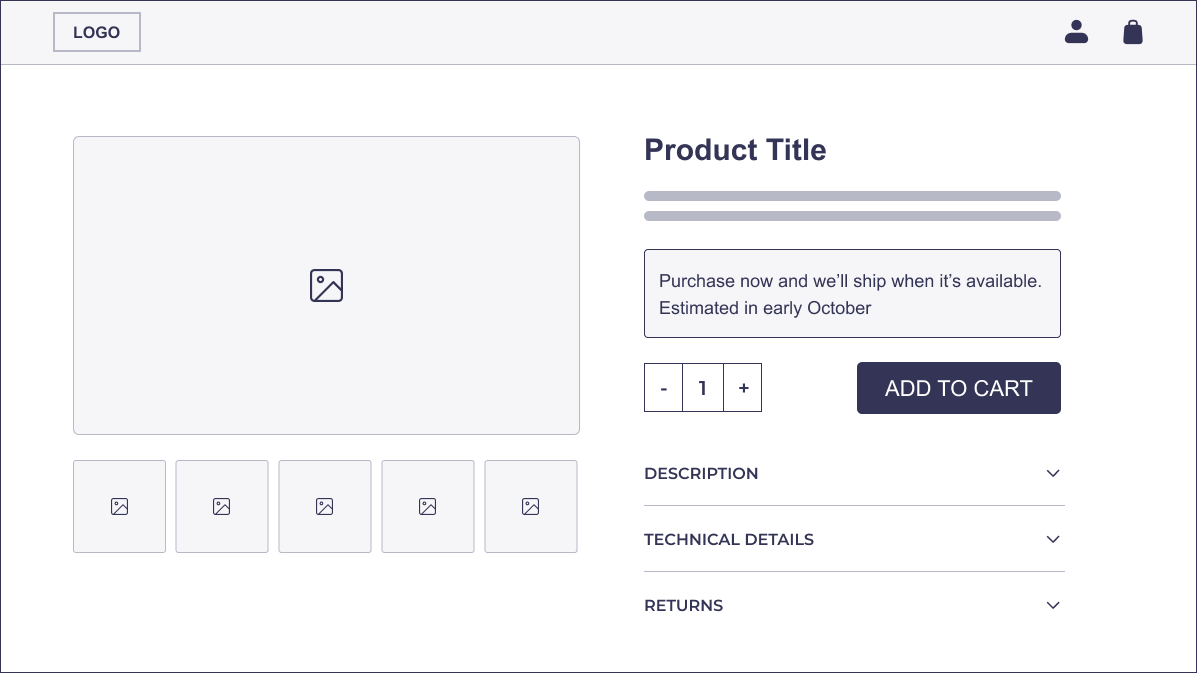
In fact, users may not even notice or care that the item is currently unavailable if the delay is minor and well-communicated. The key is to embed dynamic messaging directly on the product page, explaining the reason for delay (e.g., “Ships in 2–3 weeks due to restocking”) and reinforcing this in confirmation emails. For larger delays, context and alternatives should be offered such as displaying similar in-stock products or variations.
Implementing Delayed Delivery
To avoid friction, the most effective implementations surface delivery delay information early and repeatedly throughout the purchase process.
Best practice includes:
Dynamic Messaging on the Product Detail Page (PDP):
The expected delivery window should replace or supplement the usual shipping time on out-of-stock items. For instance, instead of “In stock – ships tomorrow,” display: “Ships in 2–3 weeks due to restocking. We’ll notify you once it ships.”
Tooltips or Inline Explanations:
When delays are longer than a few days, users benefit from concise explanations. Phrases such as: “This item is temporarily out of stock. You can still place your order, and we’ll deliver it by [date estimate],” help reduce hesitation and preempt post-purchase anxiety.
Checkout and Confirmation Transparency:
Reiterate the extended delivery date at checkout and in the confirmation email. Failing to do so can cause customer service issues and post-purchase regret.
Alternative Suggestions When Delays Are Significant:
For products where delay tolerance is low (e.g., gifts, time-sensitive purchases), offering alternative products that are in stock helps retain the customer within the site ecosystem.
Discontinued vs. Temporarily Unavailable:
Clearly distinguish between “Out of Stock” and “Discontinued” products. Use terminology such as “No longer available” or “This item will not be restocked” when appropriate to avoid misleading the user.
Operational Considerations: Inventory, Fulfillment & Scalability
Implementing this strategy requires coordination across digital, inventory, and logistics teams. Key operational enablers include:
Inventory System Integration:
A prerequisite for accurate delivery estimates is real-time visibility into supplier stock levels and restock schedules. This often involves integrating ERP or warehouse management systems (WMS) with the eCommerce platform to automatically generate estimated delivery dates.
Restock Forecasting Models:
Dynamic delivery timelines are most effective when tied to forecast models based on supplier reliability, historical delivery times, and logistics throughput. Where variability is high, consider adding a buffer to avoid late shipments.
Fulfillment Partner Coordination:
Third-party logistics (3PL) partners must be equipped to handle delayed fulfillment workflows. Orders for out-of-stock products must be queued without triggering shipping SLAs or customer communications prematurely.
SKU-Level Controls:
Some platforms allow merchants to enable or disable delayed delivery per SKU. This is particularly valuable for distinguishing seasonal, batch-made, or non-repeatable products from those that are routinely restocked.
Risk Management & Metrics
While enabling delayed delivery mitigates cart abandonment, it introduces its own set of risks. Managing those proactively is key to long-term viability.
Risks and Mitigations:
Delayed Restocks → Customer Frustration:
If restock ETAs are inaccurate, customers may become frustrated. Mitigate by:
- Communicating delays proactively via email.
- Offering cancellation or compensation (e.g., store credit).
- Providing clear timelines and status updates post-purchase.
Support Load Increase:
Longer delivery times can result in more inquiries. A robust post-order notification system with shipping milestones helps reduce support tickets.
Stock Fluctuations and Overselling:
Real-time syncing of stock levels is critical to prevent overselling or failed orders.
Success Metrics:
To assess performance, track:
- Conversion Rates on Out-of-Stock Product Pages: Measure how many users proceed with a delayed delivery order versus abandonment.
- Revenue Recovery Rate: Calculate the total value of orders placed under the delayed delivery model versus estimated loss from “dead-end” stockouts.
- Customer Satisfaction (CSAT) and NPS Scores: Survey buyers who placed delayed delivery orders. Monitor satisfaction and compare it to regular order experiences.
- Fulfillment Accuracy vs. Estimated Delivery Date: Track how often the actual delivery matches the communicated timeframe. A high accuracy rate builds trust and repeat business.
Conclusion
Losing a customer due to a temporary stockout is both avoidable and costly. Most users encountering an “Out of Stock” message are not willing to wait passively or return later, especially when competitors are just a search away. Allowing users to place orders for temporarily unavailable products, paired with dynamically adjusted delivery timelines, transforms a potential point of abandonment into a retained sale.
This approach works best when communication, operations, and design are aligned. By treating “out of stock” not as a failure point but as an opportunity to extend the digital shelf, retailers can reduce churn, maintain revenue continuity, and improve user experience.